Sends the run's result to a Telegram chat, group or channel.
notify.telegram
The piece
Send the run's result to a Telegram chat, group or channel.
Reach for it when
You want it on your phone, without another app.
A small group that would rather not be in a Slack workspace.
Send to Telegram
Idle
In the bag
Every setting this block has. A field marked only when appears once you have chosen the mode above it — those are alternatives to each other, not extra things to fill in.
Bot tokenRequired
write-only
From @BotFather. The bot must be in the chat you're sending to.
starts at Run failed on {{ $Device Manual Trigger.json.device }}
Supports {{ }} references to earlier steps, e.g. {{ $Device Info.json.model }} or {{ $Find in Text.json.first }}.
Attach the last screenshot
starts at on
The screen as it was at the last step — usually the whole explanation.
Only if a step has failed
starts at off
Skip the message when every step before this one passed. This is what a nightly regression wants: silence is the good outcome.
Get your keys
What to click on the other service's side to get the values this block asks for. Paste each one in, then use “Save as credential” so it is encrypted and kept out of the workflow.
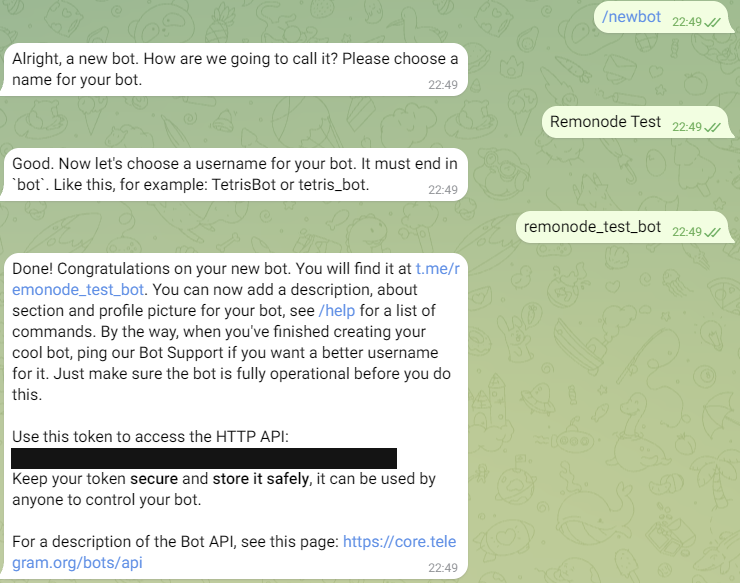
1In Telegram, open a chat with @BotFather (the one with the blue check) and send /newbot.
2Answer its two questions: a display name, then a username that ends in “bot” (e.g. acme_qa_bot).
3BotFather replies with the token — copy it into Bot token.
4Add the bot to where it should post: a group → group info → “Add members”; a channel → “Administrators” → add it with “Post messages”. For a private chat, just open the bot and press “Start”.
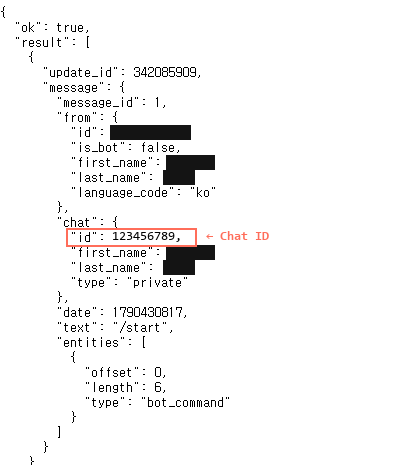
5Send the bot a message (open it from the t.me/… link BotFather gave you, press “Start”, say hi), then open https://api.telegram.org/bot<token>/getUpdates in a browser tab.
6Copy the number under "chat" → "id" into Chat ID. A group's is negative (-100…) — that is correct.
Looks like
123456789:AAHf3k…(35 more characters)
Fig. 1@BotFather: /newbot, a name, a username ending in bot — and the tokenFig. 2getUpdates after messaging the bot — message.chat.id is the Chat ID
⚠getUpdates says "result":[]? The bot has not received anything yet — most often because the message went to a different bot with a similar name. Check the chat header says the new bot, send again, refresh.
⚠The getUpdates address has your token in it. Do not share or screenshot the address bar.
⚠Lost the token? Send /token to BotFather and pick the bot. /revoke issues a new one and kills the old.
⚠In a group, a new bot only sees commands by default. If getUpdates shows nothing, send /start@your_bot in the group, or turn “Group Privacy” off with /setprivacy in BotFather.
Build it
1
Make a bot and put it in the chat
The token comes from @BotFather. The bot has to be in the chat before it can send anything to it.
Send to TelegramSettings
Bot tokenFrom @BotFather
write-only
Chat IDGroups are negative · Required
-1001234567890
2
Find the chat id
Message the bot, then read result[].message.chat.id from api.telegram.org/bot<token>/getUpdates. A group's id is a negative number, which looks like a mistake and is not.
getUpdates
private chat123456789
group-1001234567890
3
Send it
The screenshot is the one attachment Telegram takes, and there is no second slot for a CSV. It becomes the photo’s caption only when the message fits in 1024 characters; a longer message is sent on its own first and the photo follows uncaptioned.
Mobile QATelegram
remopipeAPP
Checkout failed on Pixel 8 (Android 14).
screenshot.png
What comes out
Nothing the next step needs.
Watch out
⚠There is no “attach files” switch here, and that is the API rather than an omission: sendPhoto carries one image and captions it.
⚠Use “Save as credential” rather than typing it in: a typed secret is stored with the workflow, so publishing or sharing the workflow shares the secret too.